01 / 05
SPIN IT YOURSELF
A real model, right on the page
The same logo RE:solid opens on first launch: logo.obj with its colors from the .mtl. Drag to rotate and switch modes — just like in the app.
Open a STEP assembly, cut a section, measure — and now fix it too: move a wall, drill a hole, repair a broken mesh. All on your phone: STL, OBJ (+MTL), 3MF, STEP, IGES, BREP, PLY, ZIP. Fully offline — your files never leave the device.
The same logo RE:solid opens on first launch: logo.obj with its colors from the .mtl. Drag to rotate and switch modes — just like in the app.
A real STL: a case with 2 mm walls. Drag the arrow or the slider: the end wall travels with its rounded corners, and the thickness stays. Switch to Plane and only the outer face moves, so the thickness changes. On this page the move is a simplified version; in the app you do the same on your own STL or STEP. Edit mode is part of Pro.
For 3D printing. Fix a fit right on your phone and send the file straight to the slicer.
A real STEP file: a pulley bracket with two pillow-block bearings, 42 bodies. Loaded with the same CAD kernel that runs inside the app. Drag the slider, switch the axis, hover a part to see its name from the file. Press Cut and the assembly splits into two closed halves.
For engineers. Check a fit or an inner cavity on site, no laptop needed.
A real assembly: Full Assy.3mf, 394 parts. Drag the slider or press ▶ — the parts fly out from the center, just like the app's exploded view. For the page the mesh is reduced from 1.16M to 200 thousand triangles; the app opens it in full.
For engineers and designers. Read an assembly part by part and see how it comes apart.
A real STL from Rhino: 400 thousand triangles, a 6×8 mm oval stone. Switch the metal, just like the app's material menu. The stone stays a diamond.
For jewelers. Show a client the same model in different metals.
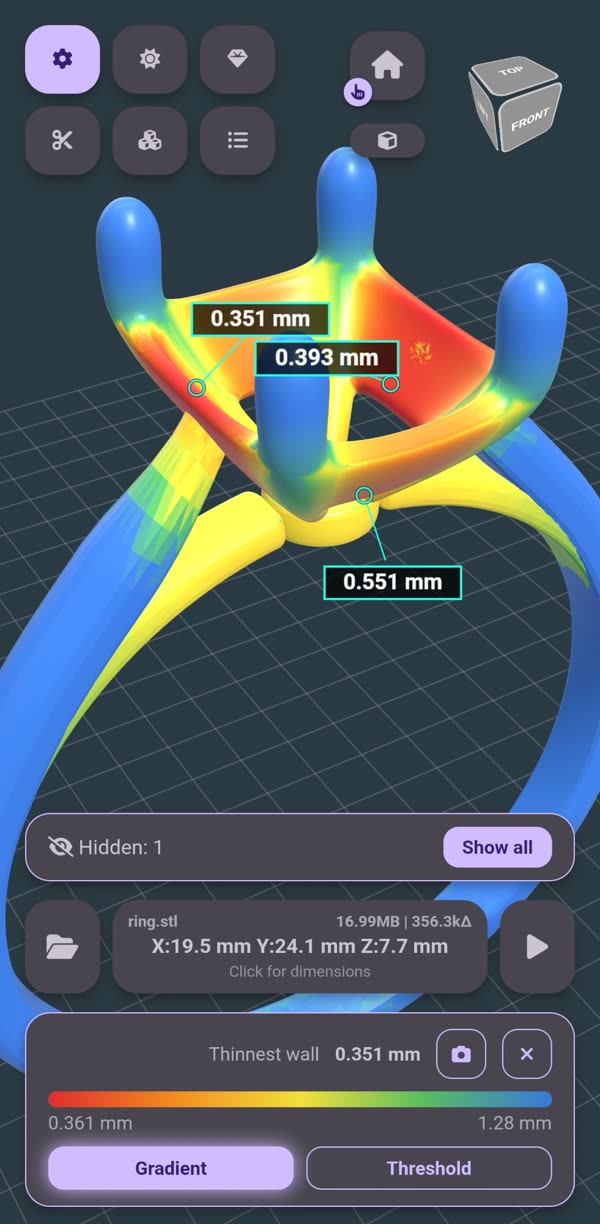
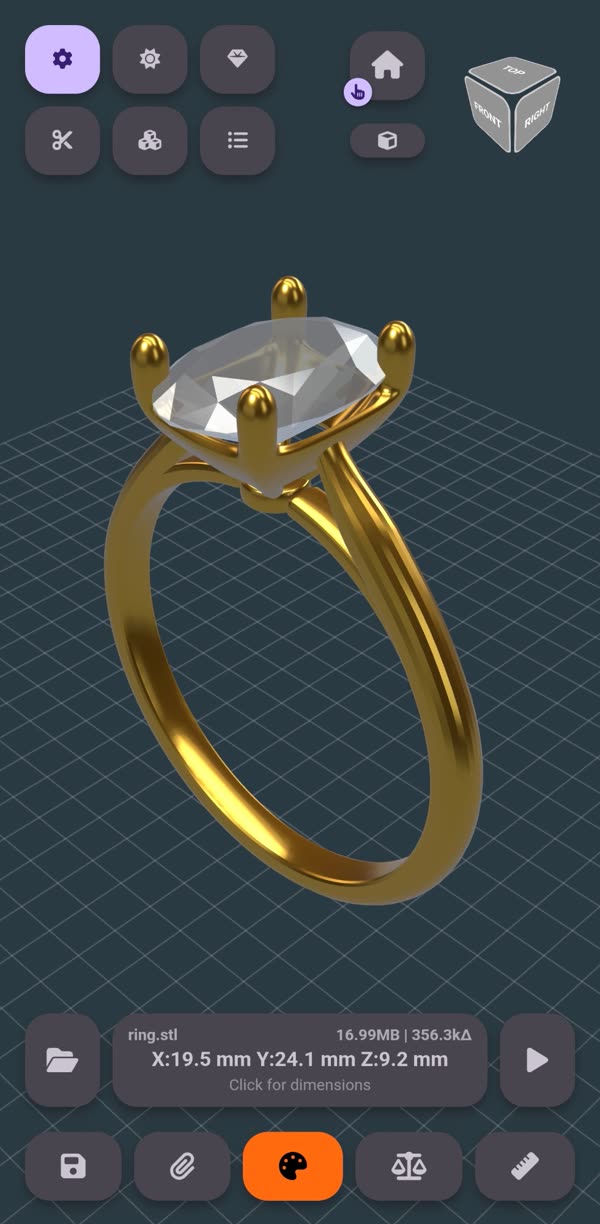
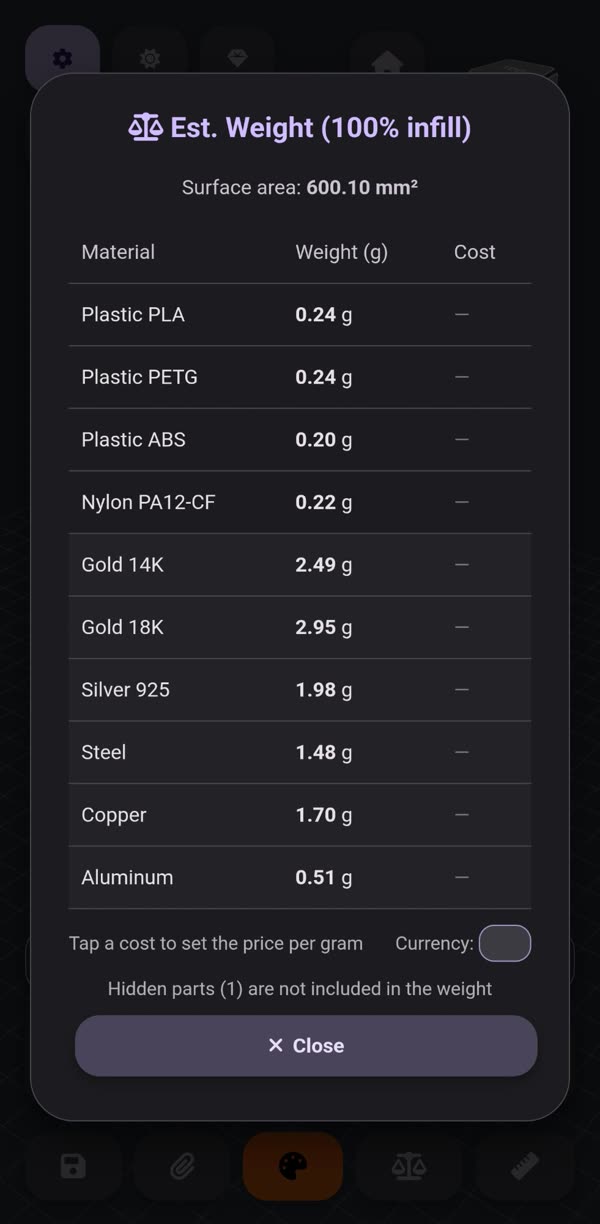
Real screenshots: ring.stl, 356 thousand triangles, a phone with no internet. Every number was computed by the app.
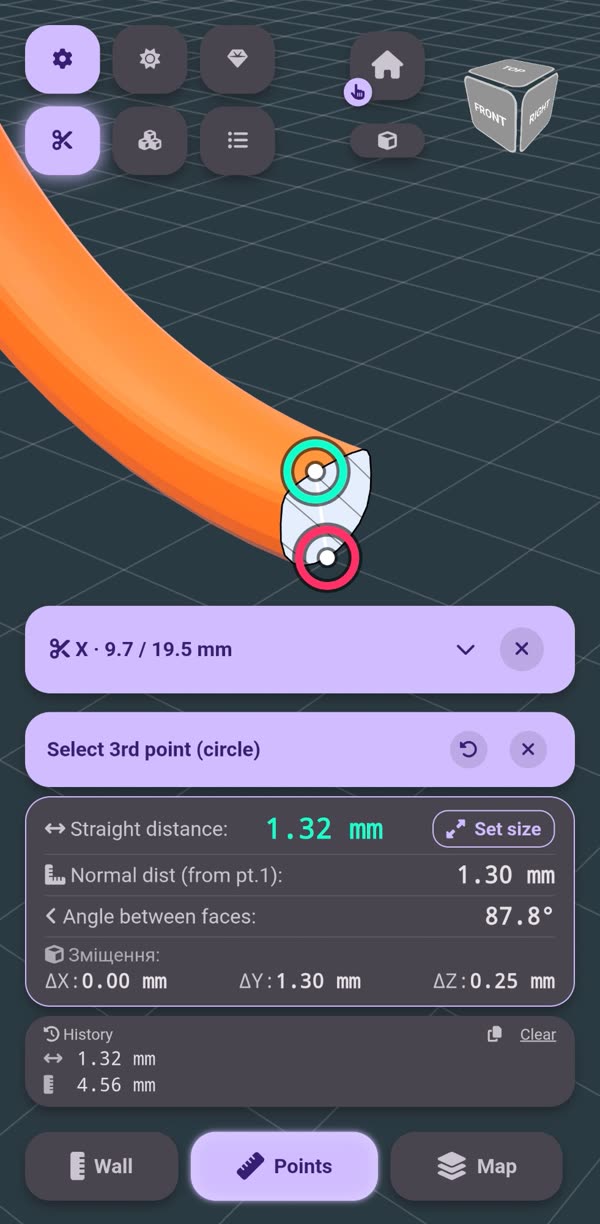
A section plane along X, Y or Z, hatched on the cut. Two taps on the edges and the shank thickness is in — snapped to vertices, kept in the measurement history.
For jewelers and engineers. Check wall thickness before the part goes to casting.
The whole part is colored by thickness: red is thin, blue is thick. The thinnest wall is labelled, and with a threshold only the spots you need to fix before casting or printing stay colored.
For casting and 3D printing. Catch the thin spot before the part fails.
A raw STL turns into gold with a stone. Hide the stone with a tap and the table weighs the setting alone — from PLA to 14K/18K gold, with surface area and cost.
For jewelers. Know the metal's weight and cost before you commit.
.stlBinary and ASCII. The 3D-printing standard.
.obj +.mtlWith materials and colors — pick both files together and colors apply instantly.
.3mfThe modern additive-manufacturing format, with colors.
.step .stpPrecise engineering geometry. Converted on-device, no internet.
.iges .brepThe same CAD kernel as STEP. Surface models open alongside solids.
.plyThe 3D-scanner format, with color on every vertex.
.zipUnpacks itself. Multiple models inside — pick one or open them all together.
Tap a flat wall, drag the arrow in 0.1 mm steps or type the number. Wall keeps the thickness, Plane changes it. It snaps flush with parallel faces, and fillets and chamfers travel along.
Move a round or rectangular hole, center it, change the Ø. Remove it and the face closes up. Or drill a new one, through or blind. Works on holes between two flat faces.
Tap a face and every bump and shallow recess on it lights up. Tap one and only it is taken. ✓ levels them with the face. For your own lettering and small features, not for deep pockets or through holes.
The model came in inches, or it doesn't fit the print bed — resize it here: by X/Y/Z dimension, by presets (×2, inches↔mm), or from a segment you already measured. Mirror, move and rotate too, a single part or the whole model.
Every defect gets a marker right on the model: gaps, inside-out bodies. Fix one or repair all, no Pro needed. Saving the repaired file takes Pro.
Every edit undoes, even a cut. Save in the format you need, or tap Share and the STL, OBJ or 3MF goes straight to your slicer or a chat.
Distances, face angles, radius and diameter from three points, wall thickness in one tap. Snaps to vertices.
Part mass: PLA, PETG, ABS, nylon — plus metals from steel to 14K/18K gold. Alongside it, surface area and cost at your own material price.
Cut along X/Y/Z or perpendicular to your line of sight, with a hatched cross-section, CAD-style. Look inside the part from any angle. And Cut splits the model into two halves with closed caps — move them apart and save.
Pull the parts apart with a slider — even if the model arrived as a single STL. The app finds separate bodies where the format stores none.
Rendered, Shaded, Wireframe, X-ray, Ghosted, Technical — with gold, silver, chrome, copper, glass, and diamond materials. Any single part can get its own color and material.
Navigation cube, ortho/perspective, lighting joystick, Zen mode on double tap.
What you see is what gets saved: one part, an assembly without the clutter, or several files merged into one — with colors, where the format keeps them. Also works as a STEP-to-STL converter.
Press and hold a part, or use the list — hide it, or isolate it and hide everything else. Handy for weighing or measuring one sub-assembly on its own.
The whole assembly by name, like a CAD tree. Names come from the file — STEP, OBJ, 3MF. The list sits in a sheet along the bottom, so the model stays visible and under your control.
The whole job on a model in one file: orientation, colors, hidden parts, the section cut, the exploded view and the camera are saved together with the model itself. Send a project on or open it on another device — a heavy STEP assembly then loads in a fraction of a second.
The explode and the spin record to video with a whole number of turns, so the clip loops seamlessly. It captures the model itself — no buttons, no phone status bar; a PNG frame is a separate menu item.
Point the app at a folder of models and it shows them with thumbnails and sub-folders, with no twelve-file limit on recents. A neighbouring .mtl is picked up automatically. Free.
Phone screen recordings — sped up, nothing faked.
Walls moved by 43.7 and 26.8 mm, the thickness stays. Then a flattened face and undo. Edit mode, Pro.
Drag it, change ⌀ 2.79 to 4 mm, remove it, drill a new one. Edit mode, Pro.
3 gaps closed and 5 debris pieces hidden, each one marked on the model. Repair is free, saving the result takes Pro.
Jewelry: section cut, thickness map, weight in gold.
Hide the stone, weigh the metal: 3.19 g of 18K gold — and the price at yours per gram.
A 29-part engine, every part by name. STEP → STL.
A 0.8 mm threshold — and two spots to fix.
A motorcycle exploded, steps by hand, recorded to MP4.
Wall 3.84 mm, angle 69.2°, hole ⌀ 6.50 mm.
Everything runs on-device: STEP conversion, weight math, measuring. No sign-up, no cloud. Works on a plane, on the shop floor, in a workshop with no signal.
Open it in RE:solid — straight from your file manager, messenger, or email.
Get it on Google Play v3.0.0 · free to view, one-time Pro for editing and the engineering tools · 3 free trial sessions · ~10 MB